Family Office Accounting Software: What to Keep, Improve or Replace
Assess gaps in your family office accounting setup, test proposed changes and compare costs before deciding what to keep, improve or replace.

Feature photograph: Jakub Zerdzicki / Pexels. Editorial image; the test below is illustrative.
A late close or unreliable family report deserves investigation. It does not tell you which component to replace. We suggest recording what failed, its cause, the expected result and who will verify the remedy.
What Does Your Accounting Setup Need to Deliver?
Start with the records and reports your office must produce. Family office accounting covers recording and reconciling financial activity for the entities and arrangements the office serves. The surrounding setup may also produce group accounts, family wealth views and investment reports. Define each required output separately, even when one platform produces several.
| Output | What to Specify | Evidence to Identify |
|---|---|---|
| Entity books | Transactions, balances, reconciliations and close dates for each entity | Ledger, supporting documents, bank records and reviewer |
| Accounting consolidation | Entities included, accounting policies, adjustments and eliminations under the applicable framework | Approved consolidation scope and reconciliation to entity books |
| Ownership or net-worth view | Whose interests are shown, effective ownership dates, valuation basis and liabilities | Ownership records, dated valuations and responsible reviewer |
| Investment-performance report | Measurement period, cash flows, valuations, fees and return methodology | Investment records and agreed calculation checks |
An entity general ledger holds accounting entries and balances. Specialist accounting functions can support investment or partnership records; reporting and operations tools may connect to those books. One platform can span several functions, or separate tools can form a controlled setup. Specify the authoritative source for each record and how connected outputs reconcile.
“Consolidated” needs a definition in your brief. For example, IFRS 10 addresses control-based financial consolidation and includes an investment-entity exception. A family dashboard combining holdings is not evidence that those accounting requirements have been met. This is software-selection guidance; ask your accounting and tax advisers to determine the treatment applicable to your circumstances. IFRS Foundation’s IFRS 10 overview.
Beside each output, record its current tool, preparer, reviewer, deadline and permitted audience. Mark mandatory requirements separately from preferences. Name the countries, currencies, asset types and volume to support, including a credible near-term change such as a new entity. Agree acceptable manual effort and exception handling. AUM alone cannot supply that specification.
Find the Cause of the Gaps Before Changing Software
Trace a recent failure from its source record to its final output. Establish whether the break occurred in the input data, an operating handoff, configuration or a capability the setup cannot provide. Keep the cause marked “unknown” until a check supports it. The same visible symptom can require different remedies.
Use this diagnostic table as a starting point, adapting the checks to your office:
| Observed Problem | Record to Inspect | Next Check and Owner |
|---|---|---|
| Month-end close slips | Close checklist, missing documents and review timestamps | Controller separates time waiting for inputs from time spent reconciling or correcting entries. |
| Two reports disagree | Reporting dates, account mappings and adjustment logs | Report preparer compares the same period and scope, then traces the difference to its source. |
| A private-asset value looks stale | Latest manager statement, receipt date and import history | Investment-operations lead checks whether the update was unavailable, unprocessed or omitted from the report. |
| A family member’s view is wrong | Ownership history, effective dates and valuation basis | Designated reviewer checks the approved ownership record against the reporting configuration. |
| A user sees another entity’s records | Role settings, report filters and exported output | System administrator tests that user’s access, including downloads, against the approved permissions. |
For a delayed close, buying close-management software is a candidate remedy only after you identify a task it could improve. Missing statements may need an escalation owner. An unexplained bank difference needs reconciliation. A completed reconciliation waiting for approval needs a reviewer and deadline.
Record frequency and effort as well as the error: which periods were affected, how long correction took and whether someone else can repeat it. A controlled spreadsheet can remain part of the setup if its checks, access and maintenance meet your requirements. An undocumented dependency on one person deserves attention regardless of the software involved.
For a broader review of recurring symptoms, see the family-office reporting warning signs.
Compare Ways to Keep, Improve or Replace the Setup
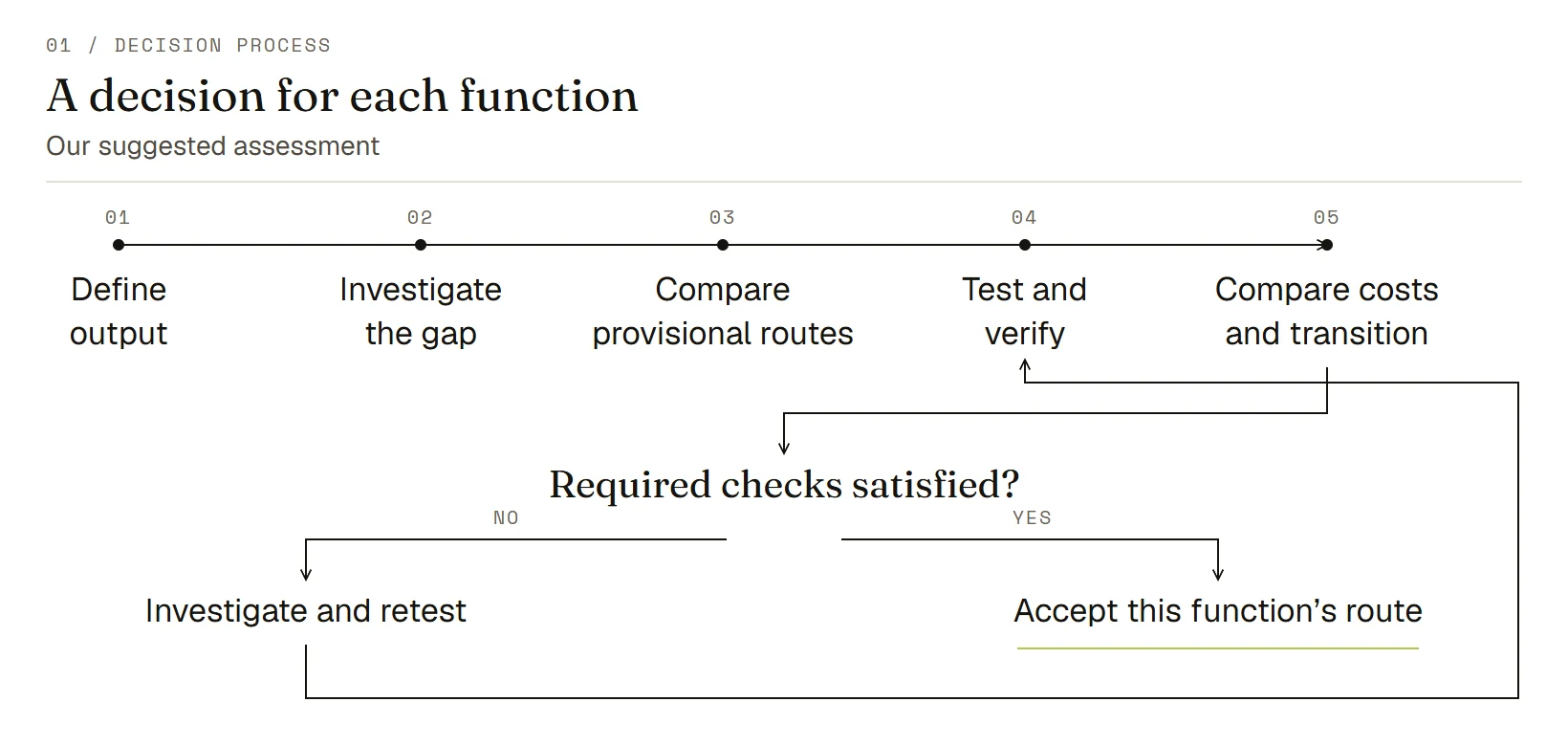
Choose a provisional route for each function. You might retain the ledger, repair ownership data and add a reporting tool in the same project. Confirm each route through testing, country and access checks, and comparable costs before treating it as the final decision. Ask the vendor about features absent from its documentation before deciding whether the capability is missing.
| Route | When It Is Worth Testing | Evidence Needed Before Acceptance |
|---|---|---|
| Keep | Required outputs and controls appear achievable within acceptable effort. | Repeatable results, accountable review and a supported operating process. |
| Improve Data, Process or Configuration | The investigation identifies a correctable record, handoff or setting. | The correction resolves the original failure and survives a repeat test, including an exception. |
| Add a Capability | The core works, but a separate function remains unmet. | The added tool and connection preserve required detail, dates, reconciliation and permissions; someone owns failures. |
| Replace the Affected Core | A mandatory gap remains and feasible process, configuration or integration remedies cannot meet it reliably within your constraints. | Documented limits of the existing options and a candidate replacement that passes the same acceptance tests. |
Two product examples show why checking the mechanism matters. We checked these documentation examples on October 10, 2026. We have neither ranked nor tested the products.
QuickBooks Online Advanced, US documentation: Intuit describes combining balance sheets, profit-and-loss reports and trial balances from multiple companies through Spreadsheet Sync. Account names, types, hierarchy and numbering affect whether accounts combine. An account-mapping problem therefore warrants investigation before concluding that a new ledger is necessary. This documentation does not establish statutory consolidation, suitability for your office or availability in every country. Intuit’s multi-company reporting instructions.
Sage Intacct, US documentation: Sage describes mapping inter-entity receivable and payable accounts, including pair-level mappings under its Advanced mapping plan. Access depends on subscriptions and permissions. This is a configuration dependency to verify when testing cross-entity payments. Sage’s inter-entity account-mapping documentation.
Ask which functions a proposed platform includes, which require modules, and which remain in connected systems. Labels such as “integrated” do not settle who maintains mappings, investigates rejected imports or approves the resulting report.
Work Through a Shared-Expense Test
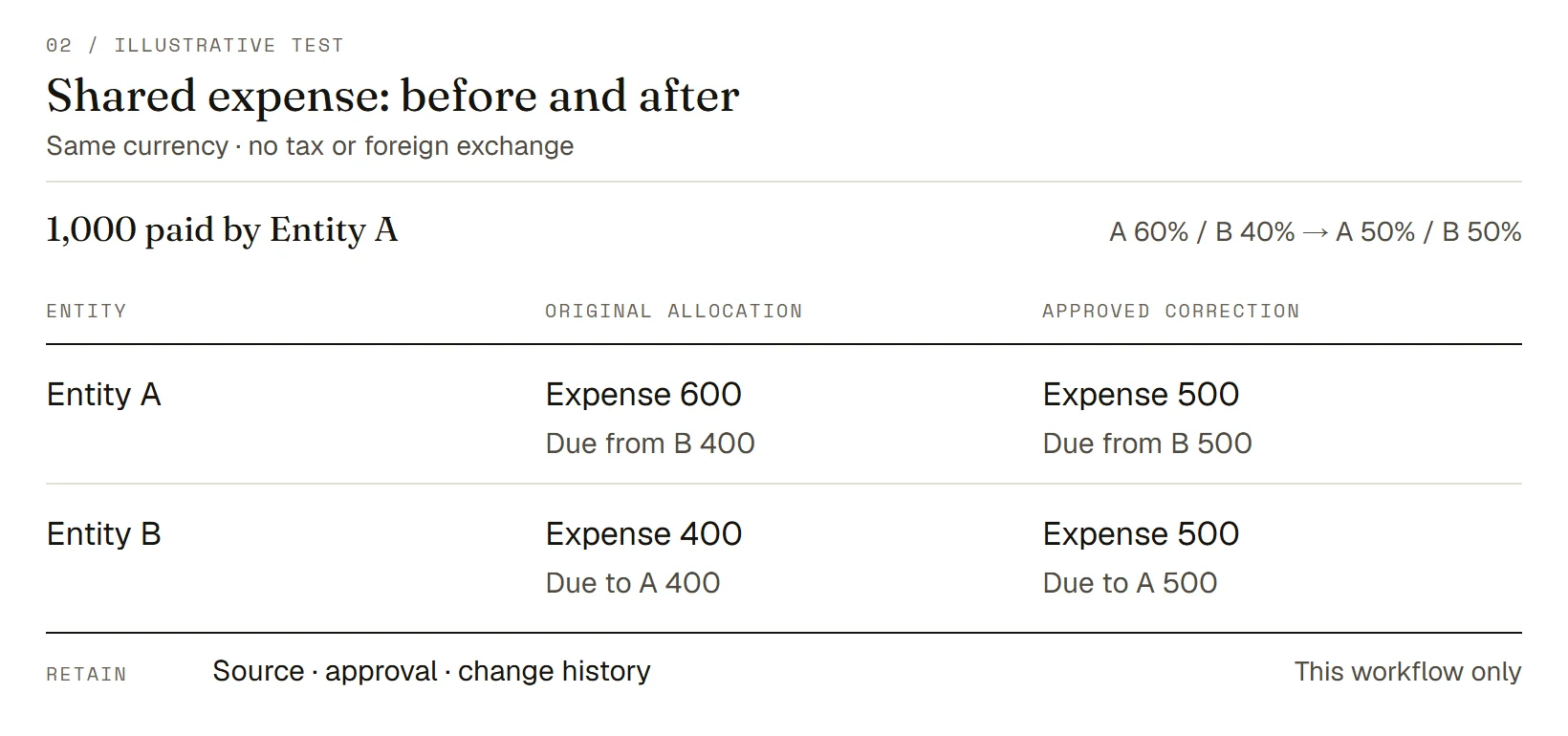
Give the current setup and any proposed remedy the same input records and expected results. The illustration below tests one shared expense across two entities, including correction history and restricted access. It shows how to build an acceptance test; it does not establish that a product passed or that the whole accounting setup is suitable.
Set the Input Records and Expected Outputs
Assume Entity A pays a 1,000-unit invoice for a service already consumed by A and B. Both use the same currency. Their accountant has approved a 60% allocation to A, 40% to B, with B owing A its share. Ignore tax, foreign exchange and other transactions. These assumptions apply to this illustration. Ask your accountant to approve the treatment of actual shared costs.
| Input | Test Record |
|---|---|
| Source | Invoice TEST-001, total 1,000; service and payment dated September 30 |
| Allocation | Approved instruction ALLOC-01: A 60%, B 40% |
| Payment | A’s bank record showing one payment of 1,000 |
| Accounts | Service expense, cash, due from B and due to A, with entity identifiers |
| Review | Named preparer and approver; reporting cutoff September 30 |
| Access | Test viewer may see A’s records but is barred from opening B’s ledger or documents |
Under those assumptions, the expected net entries are:
| Entity | Debits | Credits |
|---|---|---|
| A | Service expense 600; due from B 400 | Cash 1,000 |
| B | Service expense 400 | Due to A 400 |
Each entity’s entries balance. A’s 400 receivable matches B’s 400 payable; allocated expenses total 1,000. A combined management expense summary should show 1,000 for this invoice. That summary is not a statutory consolidation test. Sage’s documentation above supports the inter-entity mapping concept; the amounts and assumptions here are our illustration.
Check the Results and Retain the Evidence
Run the test in a demonstration or test environment using synthetic records. Compare the entity entries, expense summary and inter-entity balance report with the expected figures. Record the product edition, configuration, filters and user role so another reviewer can repeat the check.
Then introduce an approved correction: change the allocation to 50% each before the period is closed. The net adjustment for A is a 100 credit to expense and 100 debit to due from B. For B it is a 100 debit to expense and 100 credit to due to A. Final expenses are 500 each and the inter-entity balance is 500. Cash remains unchanged. The system may use reversal and reposting rather than a single adjustment; test the resulting balances and traceability.
Retain these records together:
- Original invoice, payment and approved allocation, followed by the dated correction approval.
- Before-and-after entries and reports, showing report dates, filters and entity scope.
- Change or approval history identifying who changed what and when.
- Restricted-user results, including an attempted B-ledger view and an export check.
- Exceptions, explanations and the reviewer’s acceptance or next action.
The A-only viewer may still see A’s receivable naming B if that is allowed by the agreed role. Define that boundary before testing; hiding B’s ledger and hiding every reference to B are different requirements.
Interpret the Result Within the Test’s Limits
If the expense split is wrong, inspect the allocation and mapping first. If the entries are right but the summary doubles the expense, inspect report scope and aggregation. If an unauthorized user can open B’s records, treat the access requirement as failed even when the numbers reconcile.
A successful repeat after a documented correction supports retaining that workflow with the repair. An unresolved failure remains an open requirement. Replacing the core needs further evidence that a mandatory gap cannot be resolved reliably within the office’s operating constraints.
Carry the other requirements into their own tests. For ownership history, supply an approved effective-dated change and check views before and after it. For investment reporting, supply dated valuations and cash flows with an independently calculated expected return under the agreed method. For a multi-family office, test client separation as well as entity roles. Passing the shared-expense example cannot substitute for those results.
Passing the shared-expense example cannot substitute for those results.
Verify Country, Currency and Access Requirements
Check the precise edition, entity locations and services you intend to use. A multi-currency feature alone does not demonstrate that the setup produces the local outputs your accountant needs or connects to your banks. Give each mandatory requirement an owner and retain the evidence supporting acceptance. Keep unresolved items visible in the decision record.
Use a short checklist for each relevant country or entity group:
- Product and currency: edition offered, contracting entity, transaction and reporting currencies, exchange-rate sources and supported methods.
- Data connections: exact bank or custodian, account type, feed frequency, historical depth and recovery when a feed fails. Test required payment rails separately from data feeds.
- Local outputs: sample reports and exports reviewed by the local accountant or tax adviser for the intended use. Record any filing or calculation left outside the platform.
- Access and service: permitted users, adviser roles, data location, retention/export arrangements and support coverage required by your organization.
Ask vendors to demonstrate the requested output with an appropriate sample and confirm scope in writing. Ask the office’s advisers to assess requirements within their remit. “Available internationally” is too broad to close a country-specific requirement, and a sales demonstration cannot supply the office’s accounting-policy approval.
Compare the Full Cost and Plan Any Transition
Compare the cost of delivering the same accepted outputs across the viable routes. Include the work your team and advisers must still do, plus the cost of operating connections and handling exceptions. Plan migration only for the functions you intend to change, with reconciliation and a named approver before relying on the new output.
Request Quotes for the Same Scope
Give each supplier the same entity count, users, data sources, history, reports and acceptance tests. Separate required items from optional improvements. For a constrained budget, price the mandatory scope first and show what remains manual or unresolved if an option is removed.
| Cost Area | Include in the Comparison |
|---|---|
| One-Time Setup | Data cleanup, mappings, configuration, history import, training and test support |
| Recurring Service | Licenses, required modules, feeds, support and outsourced work |
| Internal Effort | Preparation, reconciliations, approvals, exception handling and system administration |
| Change and Exit | Additional entities/users, connection maintenance, data export and termination assistance |
Use a common comparison period and currency. Mark an unquoted dependency as unknown, assign someone to resolve it and keep it separate from the priced subtotal. A low subscription price with substantial unpriced migration work is an incomplete comparison. For the retain option, include the cost of continuing the current process and any repairs it requires.
Set Migration Checks and Assign Ongoing Ownership
Agree what history moves, what stays accessible in an archive, and how to retrieve supporting documents. Reconcile opening balances by entity and account, then check the detail that matters: outstanding items, inter-entity counterparties, ownership dates and linked documents. A matching total alone can conceal misplaced detail.
Use a trial close or reporting cycle to test the full handoff, including permissions and corrections. Name the person who accepts the result, unresolved exceptions they must review, and the conditions that delay cutover. Define how to continue operations if acceptance fails; do not assume that reverting to the old system will be effortless after new transactions begin.
Assign ongoing ownership for data feeds, mappings, reconciliations, approvals and vendor escalation. Where there is no in-house accountant, identify a qualified external preparer and a named oversight owner before changing the software. The in-house, outsourced and hybrid accounting comparison explores that staffing decision.
Record Your Decision Before Shortlisting Vendors
Write the decision by function, with the evidence that supports it and the conditions still unresolved. “Keep the ledger, repair allocations, investigate ownership reporting” is a usable interim conclusion. It avoids turning an unanswered requirement into an assumed pass. Resolve outstanding mandatory output, access and local requirements before final acceptance.
Use this decision sheet for each function. The filled column assumes that a mapping repair passes the numerical checks on repeat testing; history, access and costs remain open. No product test was performed. Replace the prompts in the Your Function column with your own records.
| Decision Field | Illustrative Shared-Expense Record | Your Function |
|---|---|---|
| Requirement | Allocate the invoice correctly and preserve correction history and approved access. | Enter required output and controls. |
| Finding and evidence | Suppose a mapping repair produces expenses of 500 each and matching 500 inter-entity balances on repeat testing. Retain before-and-after reports. | Record the observed result and evidence. |
| Provisional route | Improve configuration and provisionally retain this workflow. | Keep, improve, add, replace or investigate. |
| Open checks and owner | Controller: verify correction history and restricted-user exports. Cost owner: price repair and ongoing effort. | Name each outstanding check, cost and owner. |
| Local scope and limits | Same-currency synthetic example only; verify the actual edition and local adviser outputs separately. | Record countries, currencies, edition and unresolved local checks. |
| Cost and operating effort | Repair and ongoing effort remain unpriced in this illustration. | Record comparison period, quoted subtotal, internal effort and unpriced dependencies. |
| Acceptance | Controller accepts this workflow after allocation, traceability and access checks pass within agreed effort. Assess other functions separately. | State required results and who accepts them. |
Prepare a provisional record of requirements, observed gaps and open checks before shortlisting vendors. Where it shows a need for new capability, use the family-office accounting software comparison to build a shortlist. Update the record with vendor demonstrations, comparable quotes and test results before final acceptance.
The coming shake-out in family-office software
The category has never been more crowded. Consolidation is coming — and the firms that survive will be… Knowledge & Decision · Analysis
Is a Multi-Family Office Right for Your Family? Compare Fit, Fees and Services
Compare multi-family office fit, services, fees and family responsibilities with an illustrative quote worksheet and provider-check questions. Knowledge & Decision · Analysis