Financial Software Solutions for Family Offices: Map Records, Systems and Reports
Map each financial job to its record, system and owner, then test a proposed family-office software stack with an illustrative capital call.

A family office needs financial software solutions for different jobs: keeping entity books, recording investment activity, bringing positions together, planning cash and producing reports for the right recipients. The useful starting point is to name each record, the system that holds it and the person responsible for checking it. Then test one transaction across the proposed setup. A system can display an attractive consolidated report while leaving the underlying cash movement, investment record or approval unresolved.
For a US family-office finance or operations team, the choice is a workable combination of systems and assigned responsibilities. The examples are illustrative; no named product was tested. If your immediate job is to compare platforms, the family-office software comparison covers that narrower decision.
- List the finance jobs; assign each important record a system, preparer and reviewer.
- Run the same capital-call test through each proposed setup, from notice and payment to investment record and approved family report.
- Compare suite and connected routes by demonstrated handoffs, exception controls, staff work and full costs; keep unanswered items conditional.
01What Kinds of Financial Software Solutions Does a Family Office Need?
A financial software solution is a tool that performs a defined finance job, from recording a payment to preparing an investment report. A family office may use one suite for several jobs or connect specialist systems. The required mix depends on its entities, assets, data sources, reporting recipients and who performs the work.
How Do Accounting, Investment Reporting, Planning and Payments Differ?
A consolidated view can include information that originated in several other systems. Use the output and source in each row to distinguish the jobs.
| Job | Record or output to inspect | Decisive question |
|---|---|---|
| Entity accounting | General ledger, bank reconciliation, payables and entity financial statements | Which entity's books record the transaction, and who closes them? |
| Investment data and reporting | Positions, capital activity, ownership, valuations and performance views | Where did each figure come from, and when was it last checked? |
| Planning and forecasting | Cash needs, budgets, commitments and scenario assumptions | Which inputs are actual records, and which are forecasts? |
| Payments and workflow | Instructions, approvals, settlement evidence and exceptions | Who can release funds, and how is completion proved? |
| Family reporting | Recipient-specific summaries and supporting detail | Which approved sources feed the report, and who can see it? |
One product may cover several of these jobs. A current accounting platform may already handle parts of payments and reporting. An investment reporting platform may bring together custodial and private-asset data while each legal entity keeps its official books in an accounting system. For named accounting products, use the separate family-office accounting software review.
Which Jobs Need to Connect Across Systems?
Start with the outputs people actually use: a closed entity balance, an investment view, a cash forecast and a family report. Work backward to the source document and the person who approved each figure. A connection has to carry identifiers, dates, amounts and changes in status clearly enough for a reviewer to find a discrepancy.
For example, Sage describes entity management and a general ledger for family offices. Addepar describes multi-custodial and private-market aggregation, ownership views and reporting. Those public descriptions illustrate different software roles. They do not establish that either product lacks a function described by the other, or that a particular integration is included in a buyer's contract. The office still has to define the system boundary for its own setup.
02Map Each Record to a System and an Owner
For every material record, identify the originating evidence, the system that holds the working or official record, the next view, and the people who prepare and review the handoff. The filled map below follows the Cedar Family Investments LLC example used later. Its people and systems are illustrative assignments to replace with the office's actual owners.
| Source evidence | Record and system that holds it | Next view or recipient | Preparer → reviewer | Reconcile or hold before release |
|---|---|---|---|---|
| Fund or administrator call notice | Versioned notice in document register; fund identity and payable in operations queue | Approved payment instruction and investment activity | Operations → treasury approver | Match investing entity, due date, amount and bank instructions to approved records. |
| Bank settlement confirmation | Cedar LLC bank record and its entity general ledger | Closed cash balance for the family report | Treasury and entity accountant → controller | Match authorized payment, bank debit and ledger entry; hold any unmatched amount. |
| Manager contribution confirmation and notice | Contribution and unfunded-commitment records in investment register | Investment activity in consolidated view | Investment operations → investment lead | Reconcile manager figures, entity, effective date and prior balances. |
| Dated manager or approved valuation statement | Valuation record in investment system, with source and as-of date | Dated investment value in family view | Investment team → finance reviewer | Keep valuation basis and timing visible; resolve unsupported changes. |
| Approved ledger and investment records | Versioned family report assembled in reporting system | Authorized family recipient | Report preparer → release approver | Check entity scope, cash and activity, any wealth total, open exceptions and recipient access. |
The record-holding system and the accountable person are separate assignments. A feed can transfer a value while leaving an exception without an owner; this map makes the reviewer and stop condition explicit. If an administrator prepares books or reporting, put the administrator in the preparer column and retain the office's review and release responsibility where applicable.
Which System Holds the Official Books?
Begin with each legal entity's books before building a consolidated view. Identify the general ledger used for its accounts, who posts and approves entries, and how bank balances are reconciled. If several entities share one accounting platform, ask whether reports can still isolate each entity, transaction and close period. If books are maintained by an external accountant or administrator, document the handoff and approval date rather than calling an imported balance the original ledger.
The accounting keep, improve or replace guide can help when the existing ledger is the disputed part of the stack. A reporting problem alone does not establish that the ledger must be replaced.
Where Do Investment Data and Ownership Records Live?
List each custodian, fund manager, direct investment and entity ownership record. Then mark which system stores the source file, which one normalizes or calculates a view, and who resolves differences. Multiple custodians and nested entities make identity and ownership mapping especially consequential: a duplicated account or wrong ownership percentage can change the consolidated view even when every incoming number is copied accurately.
An investment tool may keep transaction and valuation histories at a different cadence from the entity books. Record both dates. A contribution may be reflected in cash and commitment activity before a later fund valuation is available. The report should make that timing visible, with the prior valuation dated or the current value marked pending under the office's policy. For named wealth and investment platforms, the wealth-management software comparison owns the product-level review.
Who Prepares and Approves Family Reports?
Write down the report's audience and the decision it supports. A principal may need a cross-entity wealth view; an entity controller may need a close package; an investment committee may need exposure and commitment detail. Different audiences may require different permissions and review depth, even when the underlying data is shared.
For each report, assign one preparer and one release approver. Record the accounting close date, investment-data date, valuation date and known exceptions in or alongside the output. An access test should confirm that the intended recipient can open the right report and that another recipient cannot see material outside their permission. This demonstration request does not establish that a named product provides a particular access control.
03Follow an Illustrative Capital Call From Notice to Report
A capital call is a useful test because the notice, payment, accounting entry, commitment record and family report must describe the same event at different stages. The figures below are invented to show the handoffs. They assume one US investing entity, a $100,000 call entirely attributable to an investment contribution, no fees, distributions, borrowing or foreign exchange, and a contribution that reduces the stated unfunded commitment dollar for dollar. Actual notice terms and accounting policies govern real entries.
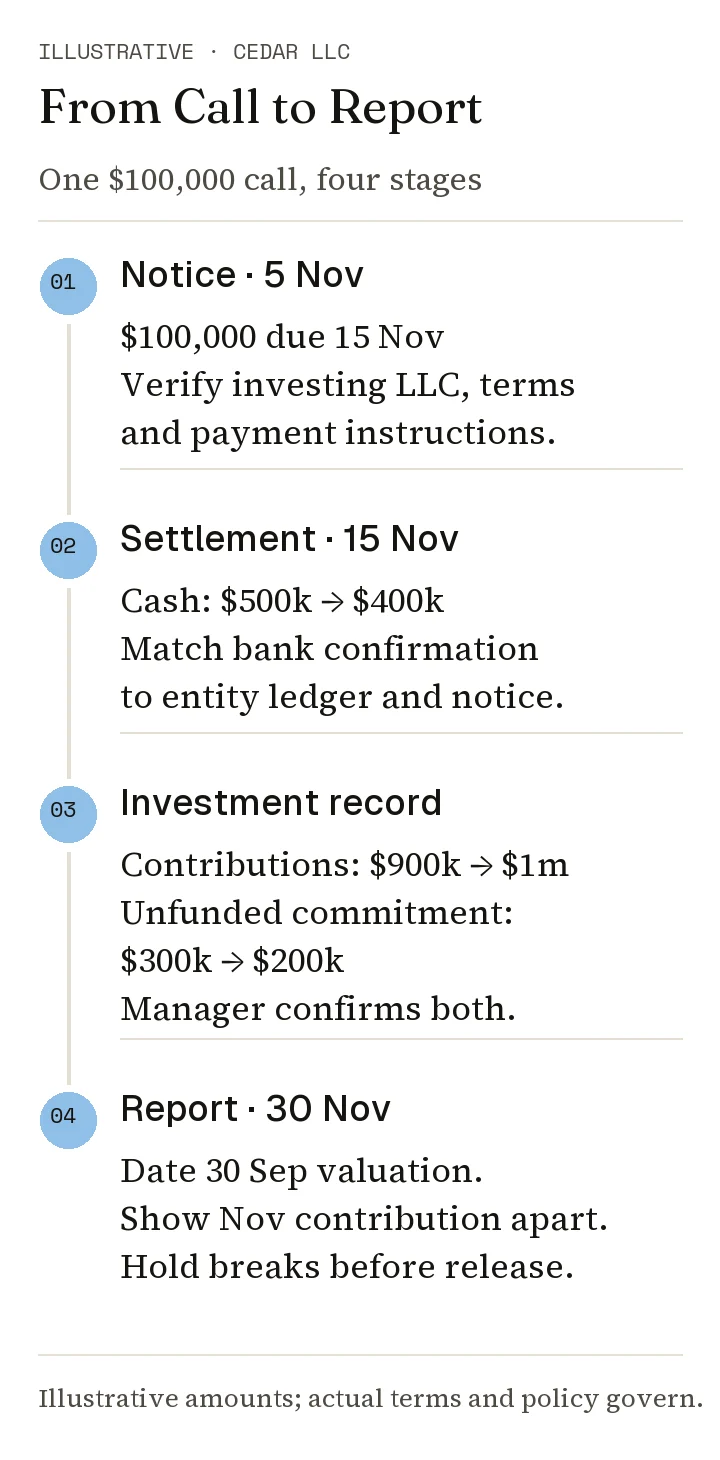
Illustrative call-to-report checks. The 30 September fund valuation remains dated in the 30 November report; actual notice terms and the office's accounting and valuation policies govern real reporting.
Start With the Notice and Opening Records
Suppose Cedar Family Investments LLC has $500,000 in bank cash. Its investment register shows $900,000 of contributions to a private fund and $300,000 of unfunded commitment before the new call. A notice dated 5 November 2026 calls $100,000 due 15 November 2026 from that LLC. The office records the fund's identity, due date, amount, payment instructions and notice version. It checks that the call is for this investing entity and that its components match the stated $100,000 payable. At this point the amount is due; the example's cash and contribution balances have not yet changed.
ILPA's capital-call template page describes standardized visibility into the accounting details and transaction components of a call. ILPA released the updated version in 2025 and says it should first be delivered in Q1 2027. Funds adopting its new Performance Template should use the capital-call template for funds launched on or after Q1 2026; for funds not adopting that template, the launch threshold is Q1 2027. ILPA's older notice best-practices document, revised in 2016 lists fields such as the fund and LP identifiers, due date, current amount, commitment and contributions. The example borrows these fields for a test; it does not assume every manager uses either form.
Record and Reconcile the Cash and Investment Changes
Assume the bank confirms settlement on 15 November 2026 and the manager confirms the full $100,000 as a contribution that reduces unfunded commitment dollar for dollar. The bank cash balance becomes $400,000. The entity accountant records the payment under its applicable accounting policy and reconciles the bank entry to the notice. Investment operations updates contributions in its tracking register from $900,000 to $1,000,000 and unfunded commitment from $300,000 to $200,000, linking the manager confirmation, notice and payment. The office checks the manager's effective date and figures; payment alone would not prove the contribution record was updated. A real call can include fees, offsets, non-cash components or other terms.
| Check | Before | Expected after settlement | Evidence |
|---|---|---|---|
| Bank cash | $500,000 | $400,000 | Bank settlement and reconciliation |
| Contributions tracked | $900,000 | $1,000,000 | Manager confirmation, notice and register update |
| Unfunded commitment | $300,000 | $200,000 | Notice terms and commitment roll-forward |
Do not treat the call amount itself as a current valuation. A contribution, a ledger carrying amount, a manager-reported net asset value and a family-report estimate can differ. Keep each label and valuation date visible. If the notice shows a different split or a fee component, revise the expected results before using the example as a test.
Check the Report Before It Reaches the Family
For a report prepared as of 30 November 2026, the preparer checks the $100,000 cash outflow, the entity ledger treatment, the manager-confirmed contribution and the $200,000 remaining commitment. Suppose the latest fund valuation is dated 30 September 2026. Label that date and show the later contribution separately; a November investment value may still be pending. Any displayed asset or family-wealth total needs reconciliation under the office's accounting and valuation policy. The call alone does not establish a $100,000 change, or no change, in net worth. The release approver checks this timing explanation, entity, recipient access and any unresolved break.
A mismatch creates a concrete stop condition. If the bank shows $100,000 paid while the manager-confirmed contribution and investment register still show $900,000, the report is held until the difference is explained. If the notice names a different investing entity, the payment and ledger route need investigation before release. The office records the exception and issues a dated, approved report only after reconciliation under its policy. This acceptance rule is illustrative; no software test is reported.
04Decide Where a Suite Fits and Where Specialist Tools Help
Choose the setup by the jobs it can perform and the handoffs the office can control. A suite may reduce the number of interfaces; a specialist tool may handle a demanding investment or reporting task while the current ledger remains in place. Demonstrated outputs, owners for critical transfers and supportable costs are important selection inputs.
Test Multi-Entity, Multi-Custodian and Private-Asset Needs
Use the office's actual structure to choose a conditional route and decide what to demonstrate.
| Starting condition | Route worth testing | Decisive demonstration |
|---|---|---|
| Entity books and close are sound; family reports are fragmented | Retain the ledger and test a reporting or aggregation layer | Reconcile a named entity balance and investment position back to source records. |
| Entity books across several vehicles are hard to close | Test stronger multi-entity accounting, with a reporting connection | Produce separate entity statements and a reviewed consolidated output for the same period. |
| Private funds and direct holdings require frequent manual updates | Test a specialist investment-data workflow alongside the ledger | Process a notice, update commitment activity and retain a dated valuation source. |
| Several custodians and family recipients need different views | Test aggregation, ownership mapping and permissioned report delivery | Trace one holding through custodian, entity and recipient views without duplication or over-broad access. |
The answer may be a retained core system plus one change. A product page can suggest a route, but it cannot prove the whole configuration or service scope. For a fund-manager reporting use case, the fund-reporting software comparison addresses that different buyer job; a family office acting as an LP should test the records it receives and the views it must produce.
Compare the Handoffs Each Setup Creates
Draw a line for each transfer that crosses a system or service team: bank to ledger, fund notice to investment register, ledger to consolidated view, valuation source to report, and report to recipient. For every line, name the sending owner, receiving owner, method, frequency and exception path. An automated feed still needs someone to check rejected records, mapping changes and delayed files.
Compare two viable setups with the same example. If a suite absorbs investment activity but requires a separate valuation upload, that upload remains a handoff. If a specialist layer links to the ledger but leaves bank payments with the office, the payment approval remains with the office. Ask each provider to show the actual configured route. Public feature descriptions do not establish which modules, integrations or services are in a specific proposal.
05Test the Proposed Stack With a Representative Demo
Give each candidate the same input and required outputs, then observe its proposed configuration. The Cedar records provide a test fixture; the buyer's work here is to capture what the provider actually demonstrates, how an error is handled, and which parts depend on modules, services or office-run controls. Keep the test record alongside the proposal.
Specify the Input, Expected Output and Pass Conditions
Give the teams proposing the full setup the Cedar notice, opening records, entity ID, dated prior valuation and three test identities: a privileged administrator, an authorized Cedar report recipient and an unauthorized recipient. Test the complete route, including office-run and external-system steps when a specialist handles only part of it. Name the owner and evidence for each handoff. Use this proposed buyer test to record three observations:
- Trace: Show one transaction ID or linked evidence path through notice intake, bank/ledger reconciliation, investment activity and report. Save the produced records or exports.
- Hold: Introduce a wrong-entity notice or duplicate payment reference. Show the alert or override log, named resolver and blocked report release while the exception is open.
- Release: Correct the input, rerun the reconciliation and show the approved report with dates and the applicable wealth-total treatment. Confirm access for the authorized recipient, denial for the unauthorized recipient and the administrator's separately defined privileges.
For this demo, the control test passes when an unresolved material exception is visible and prevents release. The completed-report test passes only after reconciliation and approval. Record any step that was described but not demonstrated as unresolved, with the module, service, integration or manual control proposed to close it. An unseen step does not by itself prove a product lacks the capability.
Check Access, Exceptions and Review Responsibility
Ask who can grant, change and revoke each test identity's permissions; request the resulting change logs. Have the provider show where edits and overrides are recorded and what an administrator can export for review.
In the proposal, identify who stores and returns exported data, what retention or recovery commitments apply, who responds to a security incident, and who detects and fixes a failed feed. Test a changed account code or delayed valuation during implementation acceptance. Designated internal or external security and operations reviewers should inspect the applicable technical and contractual evidence; this article makes no claim that a named product supplies those controls.
06Compare Costs and Build a Shortlist
Compare proposals against the same job map and demonstrated outputs. A lower license quote may leave conversion, data feeds, review work or exception handling outside scope. Record those items and the party responsible for them before comparing totals. Keep unknown fees or integration obligations visible until the proposal answers them.
Compare Software, Conversion, Feed and Service Costs on the Same Basis
Request each candidate's quote for the same entities, users, data sources, reports and support period. Use the worksheet below to record quoted, bundled or unknown for each line, with the amount and period where known. The initial “Unknown” cells are intentional fields to replace with proposal evidence; they are never zero-cost assumptions.
| Same-scope line | Suite proposal A | Retained core + specialist B | Evidence, internal owner and remaining question |
|---|---|---|---|
| Annual software and modules | Unknown: quote by entity, user and module | Unknown: core renewal plus specialist quote | Contract term, renewal basis and any usage limit; CFO |
| One-time conversion and setup | Unknown: history, cleanup and acceptance | Unknown: two-system history and mapping | Sample converted records, who validates them; controller |
| Annual feeds and third-party data | Unknown: build, data charges and monitoring | Unknown: interface plus data charges | Named feeds, failure response and change fees; operations lead |
| Recurring service and support | Unknown: administration and report scope | Unknown: core and specialist service split | Service agreement, issue response and review evidence; COO |
| Internal work | Unknown: role and hours per month or quarter | Unknown: role and hours per month or quarter | Close, exception, valuation and release workload; team lead |
When a charge is bundled, mark the bundle and ask which deliverables it includes. Pick the same comparison horizon for both routes, such as three years; put one-time charges in their actual period and annualize recurring amounts. When software and outsourced administration are combined, compare record and control ownership as carefully as the invoice. The table is a copyable buyer worksheet; it contains no public price comparison.
Add Internal Review and Ongoing Handoff Work
Estimate the office time required to check imported data, approve entity closes, resolve feed breaks, review private-asset marks and release reports. Use named roles and a representative month or quarter rather than an unsupported industry average. If a provider handles a task, identify the service deliverable, review evidence and escalation path. If the office handles it, include that workload when comparing proposals.
Implementation also changes responsibility. A feed built once can require updates when a bank changes files or the entity chart changes. Write down who notices the failure, who fixes the mapping, who tests the correction and whether that work is in the recurring agreement.
Narrow the Shortlist With Demo Results, Handoff Risk and Costs
Use the Cedar demo's trace, hold and release observations as the required test record. Under this proposed shortlist method, exclude a setup when it fails a required test and has no scoped remedy, or a critical handoff has no accountable owner. Keep a conditional candidate when a capability or cost is unresolved, naming the next evidence: a sample export, integration design, service agreement, access test or itemized proposal.
Keep a decision record with one row per viable route: demo result, exception outcome, handoff owner, known one-time and annual costs, unknowns, and next proof needed. Keep unresolved routes conditional, with the missing proof, remedy owner and cost recorded. Advance only routes that pass the trace, hold and release checks, including a successful retest after any remedy. Send the same record map and Cedar fixture to finalists for scoped proposals, then verify the proposed implementation and ongoing controls against that record.
The embedded OCIO and your reporting stack
Outsourcing the investment office is increasingly common. What it does to your data, your independence, and your book… Investment & Portfolio · Analysis